The domain life cycle in one minute
A domain name is never bought for good. You register it for a fixed period, usually between one and ten years, and from then on you rent it by renewing it. If nobody renews it, the name moves through a series of stages and is eventually released so anyone can register it again.
The stages are the same for most generic top-level domains such as .com, .net and .org: registration, active use, renewal, expiration, the auto-renew grace period, the redemption grace period, pending delete and release. The exact lengths depend on your registrar and on the extension, and country-code domains often follow their own rules. This guide explains each stage, using ICANN's published policies as the baseline.
If you are new to the topic, start with what a domain is. If you came here because a domain has already expired, skip ahead to the stages after expiration.
Need the domain first?
Runs the same live check as the front page. If it is taken we will show you when it expires.
Stage 1: registration
A domain life starts when someone registers it through a registrar, a company accredited to sell domain names. The registrar records the name with the registry for that extension, for example Verisign for .com, and you become the registrant. You choose a registration period, typically one to ten years, and the name is yours to use for that time.
Two practical points matter from day one. First, the contact email on the registration is where all renewal and expiry notices go, so keep it current. Second, a registered name does nothing until you point it at something with nameservers and DNS records.
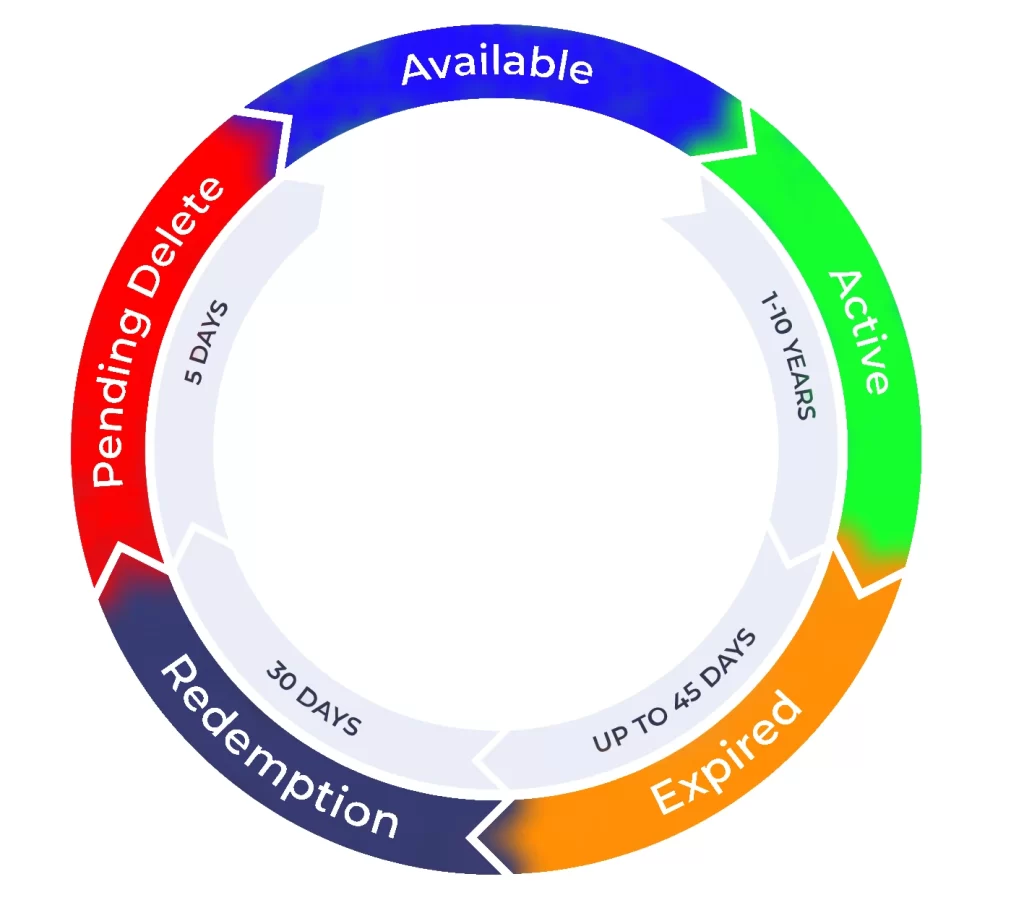

Stage 2: active use
While the registration is paid up, you control the domain. You can host a website, run email, set up redirects, transfer it to another registrar or sell it. The registry's status for the name is normally simply active.
Many people stop thinking about a domain at this point, which is exactly how names are lost. A domain that runs a business should have its expiry date written down somewhere other than the registrar's inbox.
Stage 3: renewal
To keep the domain, you renew it before the expiry date. You can usually renew for one year or several at once, and most registrars offer auto-renewal, which charges the card on file shortly before the name expires. If you use it, keep the payment details up to date, because an expired card means a missed renewal.
ICANN's Expired Registration Recovery Policy requires registrars to send at least two renewal reminders to the registrant email: roughly one month and roughly one week before expiration. If a name expires and is deleted, the registrar must send at least one more notice within five days of expiration, with instructions for restoring it. These emails often land in spam, so check there.
- Turn on auto-renew, and keep the payment method current.
- Keep the registrant email address valid and monitored.
- Renew well before the date. Fees after expiry are often higher.
Stage 4: expiration
If the renewal does not happen, the registration expires on the expiry date. At this point the website and email usually stop working, because many registrars switch the nameservers to a parking page or remove the DNS records. Visitors see an error or an advertising page, and email sent to the domain may bounce.
Expiration is not the end. What happens next depends on the registrar's own policy, so read your registrar's terms for the exact steps and fees.
Stage 5: the auto-renew grace period
Many registrars do not delete an expired name immediately. They may offer an auto-renew grace period of between 1 and 45 days, during which you can still renew, often at the normal price, although some charge a fee. How long it lasts is the registrar's choice, and some offer none.
Be aware of the risks. ICANN notes that during this period the name may be available to third parties for registration, depending on your registrar's terms of service, and that some registrars auction expired names to a third party. The safest approach is always to renew before the expiry date.
Stage 6: the redemption grace period
If the registrar deletes the name, it enters the redemption grace period. For generic top-level domains this lasts 30 days. During it the registry does not allow the name to be transferred, and the original registrant can still restore it by asking the registrar.
Restoring costs more than a normal renewal. The redemption fee is set by the registrar, and it is often considerably higher than the standard renewal price. Registrars must publish their redemption fees, so look at yours before you need it.
Stage 7: pending delete
If the name is not restored during redemption, it moves into the pending delete status, which lasts 5 days. In this stage the name cannot be renewed, transferred or recovered by anyone. It is simply counting down to deletion.
This is the stage that expired domain hunters watch. The date a name will drop is predictable, which is why so many people monitor pending delete lists and why tools such as our expiring soon list exist.
Stage 8: release
When pending delete ends, the registry deletes the name and it becomes available for registration again, on a first-come, first-served basis. Anyone can then register it at the registrar of their choice for the normal price of a new domain, with no previous owner to negotiate with. Popular names are often caught within seconds by backorder services, which try to register them the moment they drop.
A re-registered domain is a new registration. The old owner has no special claim, and the name starts the cycle again at stage one.
How long does the whole process take?
Add up the maximum periods for a typical generic domain and the picture looks like this:
| Stage | Typical length | Can the owner renew? |
|---|---|---|
| Auto-renew grace period | 0 to 45 days, set by the registrar | Yes, usually at the normal price |
| Redemption grace period | 30 days | Yes, by paying the redemption fee |
| Pending delete | 5 days | No |
So from expiry to release it can be as short as a few days, if the registrar deletes quickly, or up to roughly 80 days when every grace period is used. Country-code extensions have their own timelines, so always check the rules for the extension in question.
What you can do at each stage
If you own the domain
- Before expiry: renew, and switch on auto-renew.
- After expiry, in the grace period: renew immediately at your registrar, and check the fee first.
- In redemption: contact your registrar and ask for a restore. Expect a higher fee.
- In pending delete: nothing can be done. The name is going to be released.
If you want the domain
- Watch the name: the expiry date is visible in a WHOIS lookup, though registrars may hide some details.
- Use a backorder: backorder services try to register the name at the moment it drops. Compare their rules and fees before you sign up.
- Browse what is already free: the names on our expired domains list can be registered right now at the normal price.
Before you buy one, read our guide to expired domains. A name that looks perfect can carry a past you do not want.
Common questions
Can I get my domain back after it expires?
Often yes. During the auto-renew grace period, if your registrar offers one, you can renew it. After deletion, you have 30 days in redemption to restore it for a fee. Once it reaches pending delete, it can no longer be recovered.
Does everyone get the same grace periods?
No. ICANN requires generic registries to offer a 30-day redemption period, but the auto-renew grace period is the registrar's choice, and country-code domains follow their own rules.
Is a dropped domain the same as an expired one?
Not quite. An expired domain has passed its renewal date but may still be recoverable by the owner. A dropped domain has been deleted and released. Our dropped domains guide explains the difference.